Free role manager plugin
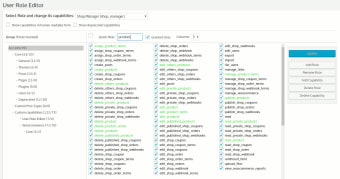
User Role Editor is a free role manager plugin for WordPress that lets you assign and manage roles on your site. As soon as you have all your roles placed, you can tick checkboxes to indicate what permissions they should have. If you see any roles created by users, you can easily remove or alter them for improved compatibility. Other plugins with similar features include User Roles and Capabilities, Members, and Capability Manager Enhanced.
Unfortunately, the free version is plagued with advertisements, so you’ll need the Pro version to remove them. It also adds more functions, such as blocking specific roles, hiding login menus from non-members, inserting registration widgets, and network admin management. You’ll also need the upgraded account for support.
Assign and manage roles
When you have a WordPress site where you assign roles to admin and visitors, it’s best to have a system that restricts content and access based on roles. User Role Editor makes the process more straightforward, saving you from spending too much time doing the manual settings. All you have to do is assign the role, which relates back to the permissions you ascribe to them in the backend.
Add widgets and menus
After you have everything set up in terms of roles and permissions, you can add menus and widgets to your site to make it easier for members and admin to sign in via a portal. Unfortunately, everyone will have access to this page until you upgrade to the Premium version.
Premium features
There are many more features that make the Premium edition more attractive. Besides removing adverts, you can block meta boxes from specific pages, and you can deal with multi-site management with a Network Admin tool. You can also select what the roles can see on various pages, such as drop-down boxes, restricted content, posts, and media.
The right role for members
User Role Editor has several basic role management tools that will make your work easier on your site. While most of the advanced tools in the Premium version are more attractive, you can get away with using the free edition on small sites.
It helps with ensuring everyone has the right access to different content and tools.